Aprender Juntos
by Scout Spain
Put Aprender Juntos on your home screen
It only takes a minute and works on any phone or tablet — no app store needed. Once it is on your home screen it opens full-screen, just like a normal app.
First: turn off the desktop view
On Android, tap the ⋮ menu in Chrome and make sure "Desktop site" is unchecked. On iPhone, tap the "aA" icon in Safari's address bar and choose "Request Mobile Website" if it offers it. Adding the app while the desktop view is on makes all the text tiny.
Already added it and the text looks small? Delete the icon, turn the desktop view off, then add it again.
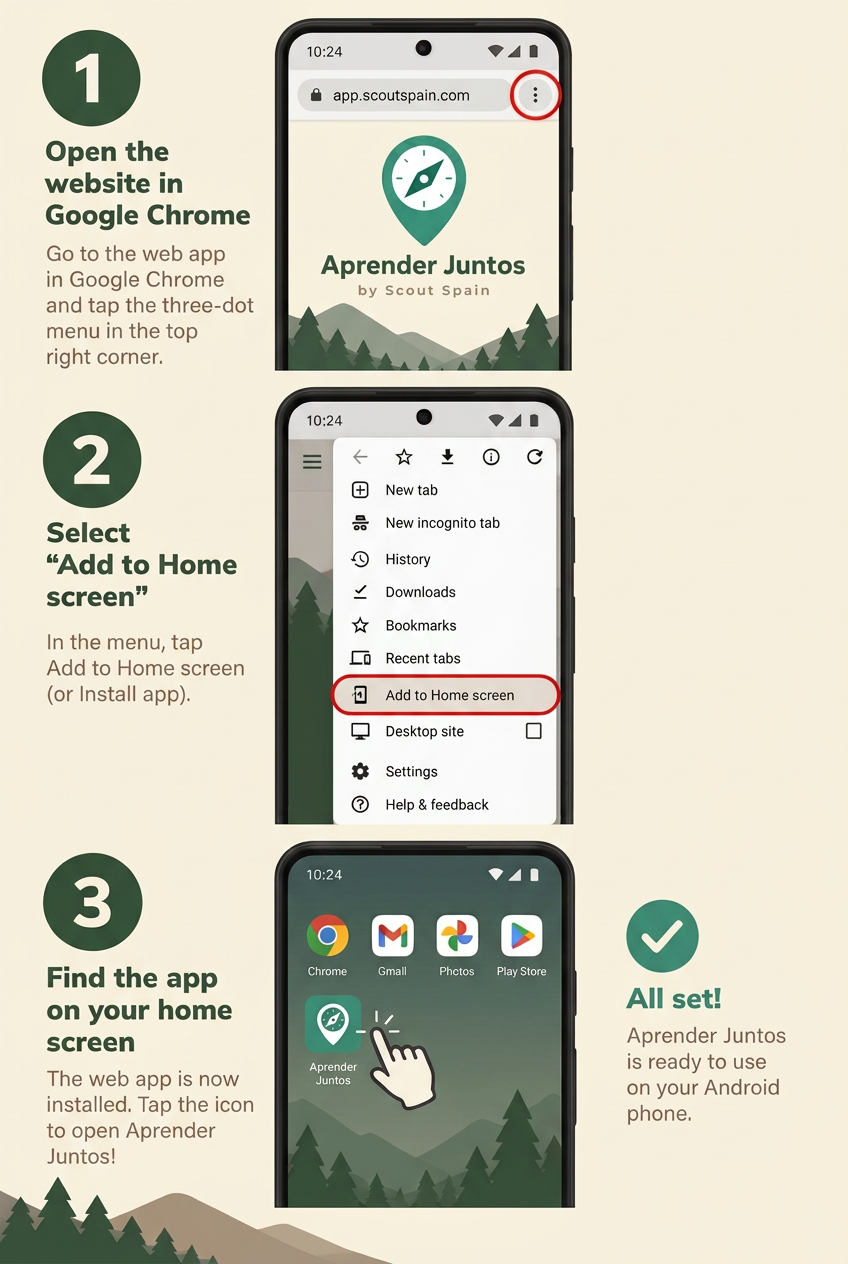
- 1In Chrome, tap the three dots menu at the top right.
- 2Make sure "Desktop site" is NOT ticked, or everything will look tiny.
- 3Tap "Add to Home screen" (it may say "Install app"), then tap "Install" or "Add".
Tip for families: repeat this on each phone or tablet your family uses. Everyone keeps their own profile and 4-digit code, so the same installed app works for the whole family.